Bed-level inventory: selling a dorm one bed at a time
Every dorm bed has its own bookings, its own place on the calendar and its own price if you want one.
What is bed-level inventory?
Bed-level inventory means the system knows each bed as its own thing. Bed 4 in the six-bed mixed dorm has its own bookings and its own place on the calendar. Hotel software knows "Room 12, sleeps six" and leaves the rest to you and a whiteboard. It matters on days like these:
- Three people book the last beds in the same dorm on three different sites within the same minute.
- A group of five wants to sleep in the same dorm, together.
- A guest extends their stay, and their bed has already been sold for tomorrow.
HostelMate is built around the bed, not the room.
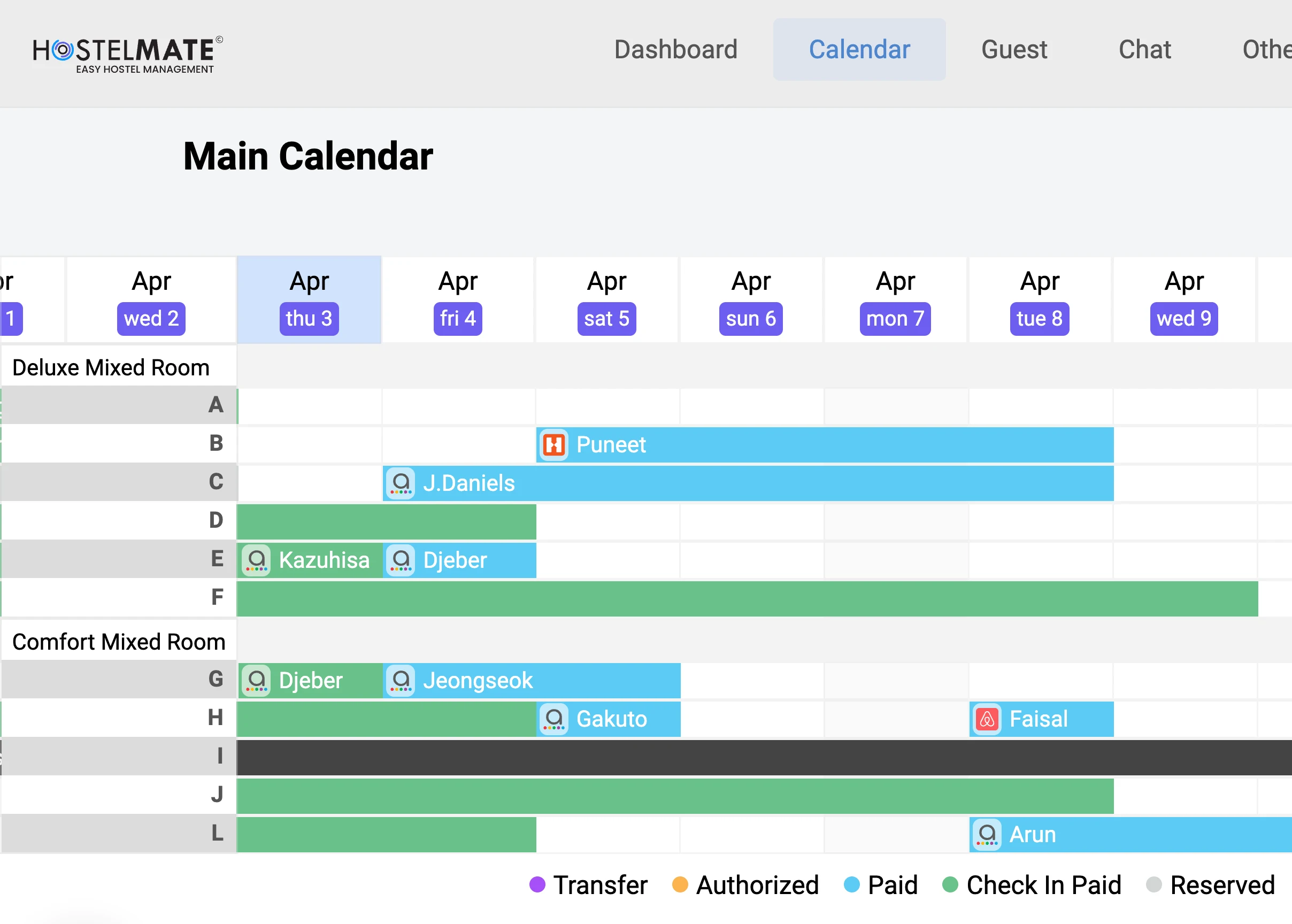
Every booking lands on a specific bed, availability is counted bed by bed across every channel and your booking engine, and the calendar shows each bed's status at a glance.

What the colours on the calendar mean
Booking status, bed by bed
- Green: Paid and check-in done (Reservation status: Check-in Paid)
- Blue: Paid but not checked in yet (Reservation status: Paid)
- Grey: booked, not paid yet, and the guest's card hasn't been tried (Reservation status: Reserved)
- Purple: The guest has been moved from one hostel to another (Reservation status: Reserved)
- Orange: The amount is temporarily held but not charged (Reservation status: Authorized)
Assigning and moving beds
On the visual hostel calendar, assigning and moving guests is drag and drop:
- Click to assign: put a booking on a bed in two taps
- Conflicts flagged before they turn into an overbooking
- Group blocks keep a group's beds together
See availability across every dorm in one grid.
Questions about bed-level inventory
It means each dorm bed is sold, priced and assigned on its own, instead of the whole room being one unit. A six-bed dorm is six things to sell, each with its own bookings.
Of the ten systems in our hostel PMS comparison, HostelMate, Cloudbeds, Mews, Beds24, FrontDesk Master and WebRezPro sell single dorm beds. Sirvoy says on its own help pages that it assigns rooms, not individual beds.
Yes. You can list the same room both as a private and as separate beds, and it counts once toward your plan's bed limit, because it's one physical space. How beds are counted has the details.
Yes. Female-only, male-only and mixed dorms are set up as their own types, and the calendar warns you if an assignment doesn't fit the dorm.
We check during setup that every dorm in the system has the same number of beds as the real room, before anything goes on sale.